
Everything your agency needs
From first enquiry to final invoice — Sparky Tours runs the whole trip.
Trip Operations
Tour Blueprints
A node-canvas planner ties days to segments — build once, promote to a sellable tour, then run departures from it.
Learn more ›
Blueprints are the design surface: drag segment types onto an infinite canvas and wire the chronological journey, including branching for split groups. A finished Blueprint is promoted (frozen) into a sellable Tour — the itinerary structure and intended suppliers travel with it, so nothing needs rebuilding when you open a new departure.
Segments & Segment Library
The building blocks of every day — accommodation, transport, activity, meal, guide, or free time — reusable across tours, not rebuilt each time.
Learn more ›
Every segment keeps a live link back to its library template, so editing the library refines suggestions without silently rewriting the frozen itinerary you already sold. Build once — accommodation in Jaipur, a Kerala backwater cruise, a Golden Triangle transfer — then reuse it across every tour that needs it.
Vendors & Rate Comparison
Your supplier catalog — hotels, coach operators, guides, activity companies — with contracted rates and reliability tracking.
Learn more ›
Each library segment can map to several candidate vendors with one flagged preferred — the picker shows you every option with its rate when you're building a tour. Compare competing quotes for the same service side by side, track which one you chose and why, and build a rate history that strengthens your next negotiation.
Departures
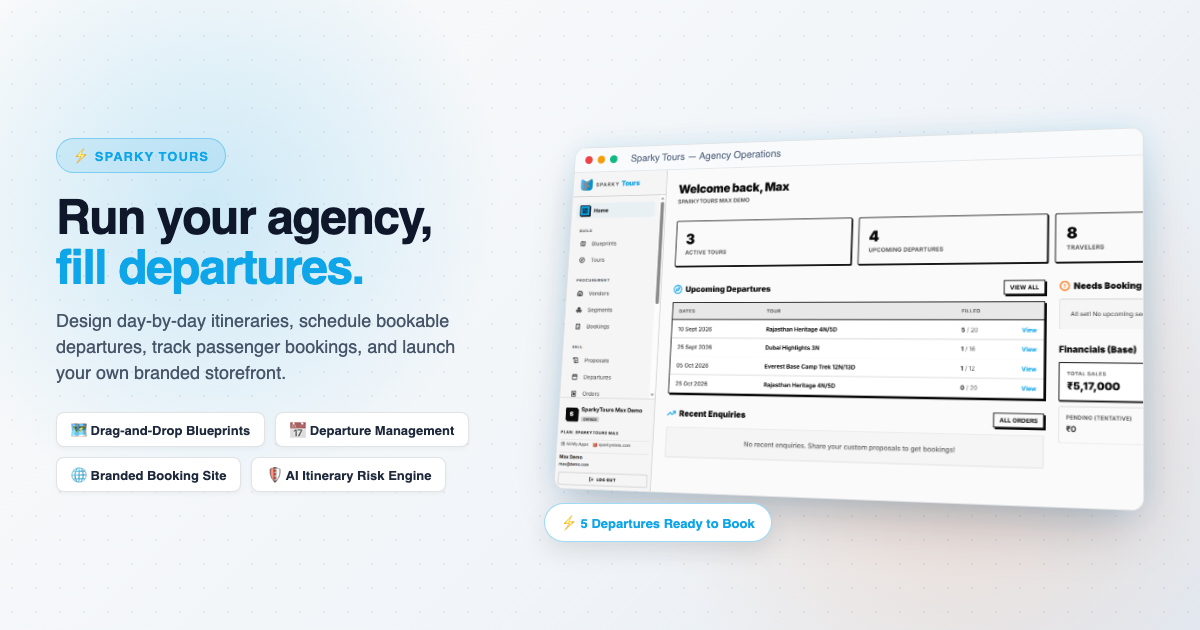
Schedule a tour to run on fixed dates, set capacity and pricing, and assign a tour manager with a dedicated view.
Orders
A traveler's confirmed spot on a departure, tracked from first enquiry through to fully paid.
Learn more ›
Orders are the sell side — what a traveler booked with you. They move through a clear lifecycle (enquiry → confirmed → paid) so you always know exactly where every booking stands, without digging through spreadsheets or chat threads.
Supplier Bookings
Track your agency's own reservations with vendors for a departure, linked to the specific tour segments they cover.
Learn more ›
The buy side, kept separate from Orders on purpose: a tour segment's default vendor is just intended until a departure actually books it for real dates. Supplier Bookings is where that commitment becomes real — pending until confirmed, prefilled from the segment's vendor and rate so there's nothing to re-key.
Vouchers
A numbered service voucher for every confirmed hotel, transfer or activity, ready to print with its reference and the driver's contact.
Transfers & Daily Operations
Pickups with driver, vehicle and plate, a daily checklist for the ops team, an incident log, and a Live Trips board on your home page while a group is on the road.
Booking Deadlines
Hotel release dates, ticketing limits and hold expiries in one list, with reminders before each one costs you money.
Itinerary Standards & Pacing
Set your own standards — steps per day, rest days, time in transit — and see a warning on any itinerary that breaks them.
Rooming, Flights & Visas
A rooming list by room group, each traveler's flights and ticketing deadline, and visa progress from not started to approved.
Travelers & Communication
Traveler Directory
One place for preferences, documents, and history across every trip they take with you.
Group Communication
Announcements and two-way messaging with travelers, in-app or via email.
Proposals
Branded, itemized pricing proposals for individual and family trips, delivered by link.
Learn more ›
Build a cost breakdown per person with optional add-ons and your agency's markup, then share it as a clean branded link — no PDF wrangling. The prospect can review and respond without creating an account.
Document & Visa Workflow
Collect and track required visa and travel documents per traveler, per departure — get alerted before something's missing or expiring.
Family & Group Bookings
Book a family or group as one party: a lead traveler, each relationship, guardians for children, a shared room group, and one invoice to the lead.
Traveler Readiness
See at a glance who still owes forms, documents or insurance on each departure, with a flag when a passport will not last the trip.
Consent Forms, Paper-First
Save your lawyer-approved wording, print blank forms for a passenger group, collect signatures, then scan each one against the traveler.
Message Templates & Timeline
Seven editable email templates, one-tap WhatsApp, and a per-traveler timeline of every email, call and note.
WhatsApp Integration
Quote proposals and departure enquiries go out as one-tap WhatsApp messages, prefilled and ready to send.
Learn more ›
Every proposal recipient with a phone number gets a "Share via WhatsApp" button alongside their link, and every departure on your public website carries a WhatsApp enquiry button that prefills the traveler's question for you. No copy-pasting, no separate app to check.
Sparky Live Companion App
Invite travelers into Sparky Live — a day-by-day plan with themes, dining and pickups, a personal checklist, documents, group chat and SOS, plus offline messaging when the signal drops.
Learn more ›
No more emailing PDFs or printing paper vouchers. The moment a companion accepts your invite, their day-by-day itinerary, documents, and a direct line to your team show up under My Trips in Sparky Live — the same app they can use for their own personal expenses and photos, trip or no trip. Messages sent with no connection queue automatically and send the moment signal returns.
See it in action
Get a live walkthrough tailored to your agency.
Finance & Growth
Payment Tracking
Deposits, installments, and balance-due tracking per order, with automated reminders.
Learn more ›
Define a payment schedule per order — deposit now, installments through the season, balance due before departure — and let reminders go out on their own instead of chasing travelers manually.
Online Payments
Let travelers pay their invoice online through your own Razorpay account Money settles straight to you, and the invoice and order update once Razorpay confirms the payment.
Plus and Max
Costing & Margin Rules
Price a tour from your vendor rates plus margin rules, and see the margin before you quote.
Season & Group Pricing
Peak-season and group-size price rules applied automatically, alongside early-bird and last-minute rules.
Add-ons
Sell extras — lounge access, private dinners, upgrades — with their own cost, price, tax rate and service code, invoiced with the trip.
Cancellation Terms
Set what suppliers charge and what you refund by days to departure; cancelling an order settles its invoice with a credit note.
Change History & Quote Versions
Who changed what on a booking, quote or departure, and a numbered version of every quote sent, so a revised price never overwrites what the client saw.
Dynamic Pricing & Coupons
Promotional coupons and early-bird or surge pricing rules, managed at the departure level.
Multi-Currency Orders & Reporting
Sell in whatever currency your traveler pays in — every report still rolls up cleanly to your agency's home currency.
Learn more ›
Orders and supplier bookings each carry their own currency, so a US traveler and a local supplier can be priced in USD and INR on the very same departure. Reports convert every figure back to your organization's base currency using its configured exchange rates, so margin and revenue numbers are always comparable.
Reports
Revenue, occupancy, and margin — by tour, by season, by destination.
Learn more ›
See buy price vs. sell price per segment and gross margin per departure, plus revenue trends by tour, season, and destination — the numbers you need for pricing decisions, not just a raw transaction log.
Tax & Registration IDs
Store your business registration and tax ID — GSTIN, VAT, or local sales tax number — and it appears automatically on invoices and proposals.
Public Website
A hosted public page for your agency, with your own branding.
Learn more ›
Every plan gets a hosted public page with a branding and hero editor — departures, proposals, and enquiries all flow straight from it.
Custom Domain
Point your own domain at your public website and drop the platform footer — your agency's site, your domain.
Max plan
Alerts & Compliance
Expiry Alerts on Your Home Page
Separate blocks for your own licences, your vendors' certificates and travelers' passports, showing what has lapsed or is about to.
Learn more ›
Keep your tourism approval, IATA and association numbers with a scan of each certificate, and record every vendor's licence, insurance and fitness certificates with their dates. Anything expiring within 60 days, or already lapsed, shows on your home page until you update it. Paid plans also get an email reminder.
Automated Reminders
Missing-document chases, supplier confirmation chases, a daily operations brief, post-trip thanks and repeat-trip nudges — each can be turned off.
Plus and Max
Setup Checklist & Starter Kit
A checklist that reads your real setup, plus sample form wording, presets and itineraries to start from.
Import & Full Export
Import travelers and vendors from CSV with a preview and error report, and export everything you have entered any time.
See it in action
Get a live walkthrough tailored to your agency.
AI
AI Itinerary Risk
Scans a departure's day-by-day itinerary and booking statuses to flag risk — an unconfirmed booking close to departure, a gap in the plan.
Max plan
SparkyIQ
A conversational assistant that can answer questions about your own data — coming soon.
Platform
Multi-Agency
Run multiple agencies or brands from one account, with full data isolation between them.
Learn more ›
Each agency/brand you run is fully isolated — separate travelers, departures, and finances — while your team can switch between them from the same login. No duplicate accounts, no data bleeding across brands.
Roles & Permissions
Owner, admin, and role-based access so your team only sees what they need.
Bring Your Own Storage
Connect your own Google Drive or OneDrive for documents, or use included house storage — your choice.
Ecosystem Snaps
Snaps directly into Sparky Invoices for automatic vendor payments, Sparky Expenses for travel budgets, and Sparky Support for customer queries.
Learn more ›
Sparky Tours doesn't exist in a vacuum. It snaps into the broader Sparky ecosystem. Vendor invoice records flow straight to Sparky Invoices for GST reconciliation, employee travel logs map directly to Sparky Expenses, and customer requests route to Sparky Support tickets.
Everything, by plan
51 capabilities. 25 on every plan, even the free one.
Paid plans add more and raise the limits. Nothing here is a demo: it is the list our plans are built from.
- Content Approval Workflow
Staff create tours and departures as drafts; an admin or owner reviews and approves them before they go live.
- Booking Deadlines
Hotel release dates, ticketing limits and hold expiries in one list, with reminders.
- Consent Forms
Your lawyer-approved wording, printed for a group, with signatures tracked.
- CSV Import & Full Export
Import travelers and vendors from CSV and export everything any time.
- Export Manifests
Generate a departure pax list, rooming list, or tour manifest as a printable PDF for the tour manager or hotel.
- Family & Group Bookings
Book a family or group as one party, with a lead traveler and guardians for children.
- Group Communication
Send announcements to all travelers on a departure. Two-way messaging between agency and individual traveler. Delivered in-app via the traveler companion app (email/SMS are separate features). On Lite this is the only comms channel.
- Itinerary Standards & Pacing
Set your own limits (steps per day, rest days, time in transit) and get a warning on any itinerary that breaks them.
- Manage Supplier Bookings
Track the agency's reservations with hotels, transport, and activity vendors per departure. Linked to specific tour segments where applicable.
- Manage Departures
Schedule a specific run of a tour on fixed dates. Set capacity, price, and tour manager.
- Document & Visa Workflow
Collect and track required visa and travel documents per traveler per departure. Alert on missing or expiring documents.
- Manage Orders
Create and manage customer orders — a traveler's confirmed spot on a departure. Tracks status from enquiry to paid.
- Manage Team
Assign roles to staff and assign a tour manager to a departure. A tour manager sees that departure's full traveler details and agenda.
- Tour Planning (Blueprints)
A visual planner for itineraries. Drag services onto a canvas and connect the journey in order, including branches for split groups. Promote a finished blueprint into a sellable tour. Needs vendor management.
- Manage Tours
Create, edit, and archive tour templates. Includes day-by-day structure and segments.
- Manage Travelers
Add, edit, and view the org-level traveler directory. Travelers are reusable across departures.
- Manage Vendors
Add and manage the org's vendor and supplier catalog — hotels, coaches, guides, activity operators — with contacts, contracted rates, and reliability ratings.
- Public Website / Portal
A hosted public page (agency.sparkyminis.com) with a branding + hero editor and live preview. Available on every plan; publishes with the platform footer.
- Message Templates
Editable email templates, one-tap WhatsApp and a per-traveler timeline of messages.
- Public Tour Catalog
Publish available departures to a public-facing agency storefront. Customers can browse, enquire, or directly place an order.
- Tax & Registration IDs
Your GSTIN, VAT or sales-tax number appears on invoices and documents.
- Traveler Companion App
Give enrolled travelers access to the PWA companion app: day-by-day agenda, document wallet, group chat, emergency info, offline access. Open to all plans — the app is the primary comms channel, especially on Lite.
- Traveler Readiness
See who still owes forms, documents or insurance on each departure.
- Service Vouchers
A numbered voucher for every confirmed hotel, transfer or activity, ready to print.
- WhatsApp Sharing
Proposals and enquiries go out as one-tap prefilled WhatsApp messages.
- AI Features Max plan
AI help across the product: draft an itinerary, spot at-risk departures early, and summarise traveler feedback.
- AI Capture and Insights Plus and Max
Read a scanned certificate or licence and pre-fill its form.
- Automated Digests & Alerts Plus and Max
Scheduled emails beyond the essential ones: an overdue-payment sweep, a weekly agency digest and a monthly statement. You can switch any of them off in Settings.
- Standalone Forms Plus and Max
Host Desk forms (Connect/Newsletter/Bug) as standalone Google-Forms-style public pages with a shareable link. On free plans forms are embed-only (on your website/portal); paid plans unlock the standalone hosted link.
- Custom Branding Max plan
Apply agency logo and brand colors to proposals, public catalog, and traveler communications.
- Custom Domain Max plan
Host your agency's public website on your own domain, for example tours.agencyname.com. DNS setup is needed.
- GST Management Max plan
Collect and store vendor GST invoices per departure. Track input tax credit. Generate output invoices for customers.
- Insurance Tracking Max plan
Track travel insurance status per traveler per order. Flag uninsured travelers before departure.
- Payment Tracking Plus and Max
Define and track payment schedules per order — deposit, installments, balance due. Send automated reminders to travelers.
- Custom Trip Proposals Plus and Max
Build and share branded pricing proposals for individual and family (FIT) trips. Cost breakdown per person, optional add-ons, agency markup. Delivered via email link.
- Margin Reports Plus and Max
See buy price vs sell price per segment and gross margin per departure. Revenue report by tour, by season, by destination.
- Email Notifications Plus and Max
Send automated and manual emails to customers and travelers — order confirmations, departure reminders, proposals, and follow-ups. Lite is app-first: in-app group communication only, no email/SMS.
- SMS Alerts Max plan
Send SMS to travelers for important alerts only — day-of departure reminders, last-minute itinerary changes. Used sparingly due to per-message cost.
- Online Payment Integration Plus and Max
Accept direct online payments for orders via Razorpay or Stripe. Payments go to the agency's linked account. Order status auto-updates on payment.
- Post-Trip Review Plus and Max
Collect traveler ratings and feedback after a departure closes. Results visible against the tour template for future improvement.
- Rate Comparison Plus and Max
Compare vendor quotes for the same service across a departure. Track which option was chosen and why. Builds historical rate data for future negotiations.
- Bring Your Own Storage Plus and Max
Attach the agency's own Google Drive / OneDrive / Dropbox as the document backend (off the platform R2 meter).
- Max Active Departures Lite 1 · Plus 5 · Max 20
Maximum number of departures in upcoming or ongoing status at any one time.
- Max Active Proposals Lite 10 · Plus 100 · Max unlimited
Maximum number of proposals in draft or sent status at any one time.
- Max Companion Seats Lite 5 · Plus 15 · Max 25
How many travelers can be invited to follow a single departure in the SparkyLive app as trip companions.
- Max Team Seats Lite 1 · Plus 5 · Max 15
Maximum number of staff accounts this org can have in SparkyTours.
- Document Storage (MB) Lite 200 · Plus 2000 · Max 20000
Document storage. Connect your own Google Drive or OneDrive to keep documents there instead.
- Max Tour Plans Lite 15 · Plus 75 · Max 250
Blueprints (draft itineraries) you can keep. Sellable tours are made from them.
- Max Tours Lite 3 · Plus 15 · Max 50
Maximum number of sellable tours the org can create and hold (total, not just active). A tour is promoted from a tour plan and can take orders.
- Max Travelers Lite 50 · Plus 500 · Max 5000
Maximum total traveler profiles the org can store in their directory.
- Max Travelers per Departure Lite 15 · Plus 30 · Max 100
Maximum capacity that can be set on a single departure. Enforced at departure creation.